Having an unlocked mobile phone allows you to travel internationally and use different carriers. Your phone can accept a SIM card from another network or provider, enabling you to make calls, browse the web, and send texts as usual. If you'd like to know if your iOS is locked, you may follow the steps below:
- On iOS 14 and above, open Settings,
- Scroll down and tap General, then select About.
-
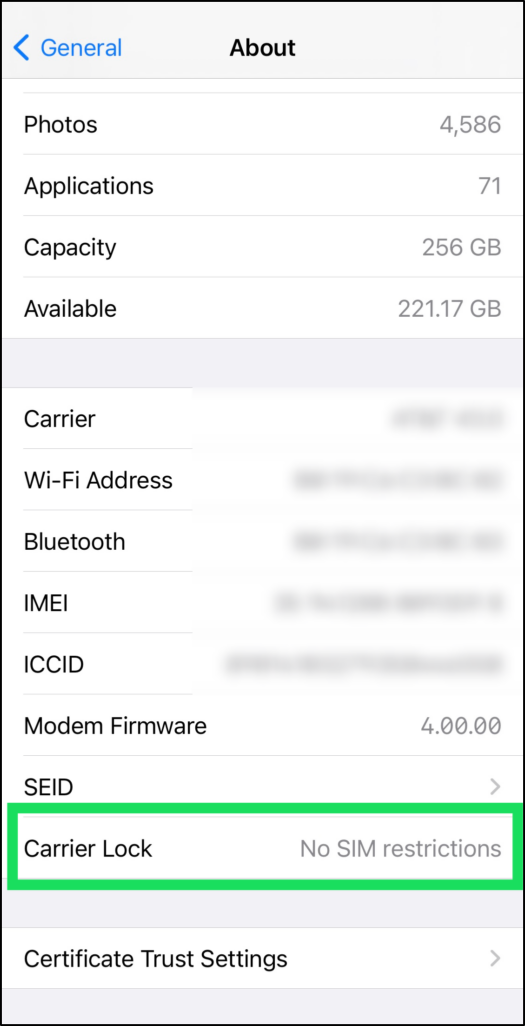
If you see No SIM Restrictions next to Carrier Lock, your iPhone is unlocked.
Alternatively, turn off your phone, insert a new SIM card from your new carrier into the SIM tray on the side of the iPhone, then turn the device back on.
 Apple Support Website for SIM Card removal
Try making a call or using mobile data to check if your device supports your new carrier, ensuring you have active service first. If you don't want to activate your new SIM card yet, check the signal icon at the top for an "x" or "No service" message. If the phone makes calls, browses the web with Wi-Fi off, or shows a signal without marks, you can use it on another network!
If you have any questions, please do not hesitate to contact our Telitravel Support Team. We are here and happy to help!